Mobility Conductor Backup Solution
Overview
This is a fully automated backup solution for using Python, SCP, and the APIs of the Aruba Mobility Conductors. In our environment, we have several conductors that manage hundreds of Managed Devices (MDs), which are WLAN controllers. The goal of this project was to ensure that the flash storage and full configuration of each Mobility Conductor was backed in a secure location every week, and that the process was fully automated.
Why I made this
You need backups for your important network infrastructure devices, it's as simple as that. Having that solution done in a fully automated manner is preferable. Mistakes will be limited and if a backup should fail for any reason, we will be notified.
Impact
Peace of mind. In our organization, this solution was previously done manually and at an irregular pace. Now, a cron job runs once a week and we don't have to worry whether or not our important devices are backed up.
How it works
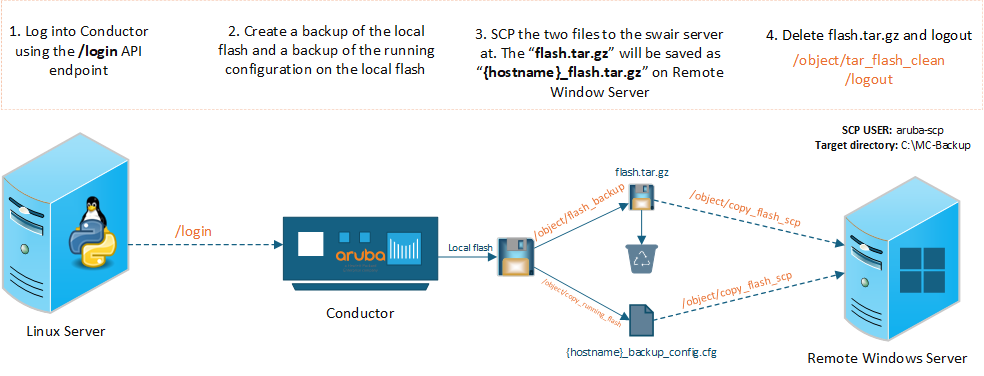
Refer to the image above to help follow along these next 4 steps. These are the core steps of the automation. Below them, I'll also be documenting how the cron job is configured, as well as how the email notifications are set up when jobs complete.
Step 1: Logging into the conductor
The API endpoint for this is /v1/api/login
This endpoint requires that a username and password be passed as parameters.
Using a GET to this endpoint, the conductor will return a JSON object containing an X-CSRF-Token and Cookies, which can be used and passed into further API calls.
Here's my full function for logging in:
def login(ip, username, password):
    print(f"Attempting to log into {ip}...")
    r = requests.get(url="https://" + ip + f":4343/v1/api/login?username={username}&password={password}", verify=False)
    logindata = r.json()
    token = logindata["_global_result"]["X-CSRF-Token"]
    uid = logindata["_global_result"]["UIDARUBA"]
    cookies = {"SESSION": uid}
    print(logindata["_global_result"]["status_str"])
    return(token, cookies)
Step 2: Creating a backup running config and flash
This is kind of two steps lumped into one, but I'll explain both. First we need a function to make POST requests to the conductor. I'll specify which parameters we will set further down.
Here's my function for making POST requests:
def api_post(url_path, token, cookies, ip, body, params):
    print("Making a POST to: " + ip + url_path)

    api_request = requests.post(
        url="https://" + ip + url_path,
        headers={
            "X-CSRF-Token": token,
            "Content-Type": "application/json"
        },
        verify=False,
        cookies=cookies,
        params=params,
        json=body)

    print(f"STATUS: {api_request}")
    print(f"POST RESPONSE: {api_request.text}")

    # Return True if successful (2xx status code)
    return api_request.status_code >= 200 and api_request.status_code < 300
Now we need to create a backup of the running config of the Conductor on to the flash of the device. To do this, the endpoint is /v1/configuration/object/copy_running_flash. This is a POST request and in the body of the request, you can specify the filename of the backed up config file. Here's my function for this:
def copy_run_flash(ip, hostname, token, cookies):
    api_endpoint = r"/v1/configuration/object/copy_running_flash"
    body = {"filename": f"{hostname}_backup_config.cfg"}
    params = {"config_path":"/md"}
    return api_post(api_endpoint, token, cookies, ip, body, params)
Next, we create the flash backup with the following endpoint: /v1/configuration/object/flash_backup. Similar to the last endpoint, we will make a POST request, and in the body we are specifying what we are backing up and what we want the filename to be. See the function below to see how I structured the parameters. Note that flash for filename actually becomes flash.tar.gz. Had to learn that one the hard way.
def create_flash_backup(ip, hostname, token, cookies):
    api_endpoint = r"/v1/configuration/object/flash_backup"
    body = {
        "backup_flash": "flash",
        "filename": "flash"
        }
    params = {"config_path": "/md"}
    return api_post(api_endpoint, token, cookies, ip, body, params)
Step 3. Transfer files to remote server using SCP
Now that the files that I want to back up are created, it's time to securely copy them to a remote server. In my case, we had a VM running Windows Server 2019 and an SCP service running. To authenticate, I used an account local to the SCP service. I configured the SCP user to have a home directory exactly where I want the backup files to live.
On the Conductor, the handy API endpoint is /v1/configuration/object/copy_flash_scp, which is used twice within the same function using two different bodies in the POST requests (one for each file). The returning result is either a string saying it was a success or a failure. Note the differences between the source and destination file names. I used the hostname to keep track of which Conductor the backup belonged to.
def scp_to_swair(ip, hostname, token, cookies, scp_user, scp_pass):
    api_endpoint = r"/v1/configuration/object/copy_flash_scp"
    body1 = {
        "srcfilename": "flash.tar.gz",
        "scphost": "10.0.0.100",
        "username": scp_user,
        "destfilename": f"{hostname}_flash.tar.gz",
        "passwd": scp_pass
        }
    body2 = {
        "srcfilename": f"{hostname}_backup_config.cfg",
        "scphost": "10.0.0.100",
        "username": scp_user,
        "destfilename": f"{hostname}_backup_config.cfg",
        "passwd": scp_pass
        }
    params = {"config_path": "/md"}
    result1 = api_post(api_endpoint, token, cookies, ip, body1, params)
    result2 = api_post(api_endpoint, token, cookies, ip, body2, params)
    return result1 and result2
Step 4: Cleanup and logout
Now the files are sent over to the remote server, we can safely delete the tar file generated containing the flash backup. The config backup can stay and will just be overwritten everytime the script runs.
On the Conductor, the endpoint is /v1/configuration/object/tar_flash_clean, which will delete any .tar files living in the directory you specify. In our case we're cleaning the /md directory on the Conductor.
Here's the function I wrote to do that:
def tar_flash_clean(ip, hostname, token, cookies):
    api_endpoint = r"/v1/configuration/object/tar_flash_clean"
    body = {}
    params = {"config_path": "/md"}
    return api_post(api_endpoint, token, cookies, ip, body, params)
Lastly, we log out of the conductor by making a GET to the /v1/api/logout API endpoint. Here's the code function I made for that. In this, I use an api_get function that look very similar to the function to login from Step 1
def logout(ipAddr, token, cookies):
    urlPath = ":4343/v1/api/logout"
    print("Logging out...")
    logout_data = api_get(urlPath, token, cookies, ipAddr)
    logout_text = logout_data["_global_result"]["status_str"]
    print(logout_text + "\n\n")
Email notifications
After the flash is cleaned, we can check the JSON responses from the /v1/configuration/object/copy_flash_scp endpoint where we copied the two files over. In this script, I have those responses stored in memory so I can check them here. What we are looking for in the JSON response is the value within the status key. If the status is SUCCESS, then we mark that one as good. Otherwise, it's marked as a failure.
All of the successes (and hopefully no failures) get composed into an email using the email and smtplib Python modules. Our organization has an accessible SMTP Relay server so it made it very to send my team an email.
Here's what that function looks like:
def send_email_report(results, smtp_server, smtp_port, sender_email, recipient_email):

    # Count successes and failures
    success_count = sum(1 for r in results if r['status'] == 'SUCCESS')
    failure_count = len(results) - success_count

    # Create email
    msg = MIMEMultipart()
    msg['From'] = sender_email
    msg['To'] = recipient_email
    msg['Subject'] = f"Mobility Conductor Backup Report - {get_timestamp()}"

    # Build email body
    body = f"""Mobility Conductor Backup Report
Generated: {get_timestamp()}

Summary:
- Total Conductors: {len(results)}
- Successful: {success_count}
- Failed: {failure_count}

Detailed Results:
{'='*60}
"""

    for result in results:
        status_symbol = "✓" if result['status'] == 'SUCCESS' else "✗"
        body += f"\n{status_symbol} {result['hostname']} ({result['ip']})\n"
        body += f"   Status: {result['status']}\n"
        if result['message']:
            body += f"   Details: {result['message']}\n"

    msg.attach(MIMEText(body, 'plain'))

    # Send email via SMTP relay (no authentication needed)
    try:
        with smtplib.SMTP(smtp_server, smtp_port) as server:
            server.send_message(msg)
        print(f"\nEmail report sent successfully to {recipient_email}")
    except Exception as e:
        print(f"\nFailed to send email report: {e}")
Completing the automation
I had to test the script a few times to make sure all went well and it did what I wanted. Something I considered was whether or not to add asychronous functionality to speed it up, but I decided to keep it sequential so I wasn't slamming the SCP server with several connections at once. All in all, it only takes about 4 minutes to get through a dozen Mobility Conductors.
I didn't go over the main function, but essential it uses all the functions posted above. The credentials get stored in a .env file and loaded securely. The cron job is configured to run every Saturday at 6am, and the email gets sent out to my team with a status on all the Conductors at that time.
References
- Link to AOS 8.x API Guide
- The swagger interface on the Conductors are super helpful too