Aruba AirWave SSL Auto-install
Overview
This project is a mostly-automated solution for installing SSL certificates on Aruba AirWave servers. To accomplish this, I used Python and the APIs on Aruba AirWave, which has one API specifically for installing SSL certs. I say mostly automated because at my organization, there is a separate team that manages and approves new certs for web servers, and that first step of obtaining a cert for renewal could not be automated. Had we been managing the certs with Aruba Clearpass, then this could have easily been a fully automated self-serve process. So this solution accounts for that single restraint and aims to make deploying new SSL certs on these servers as efficient as possible.
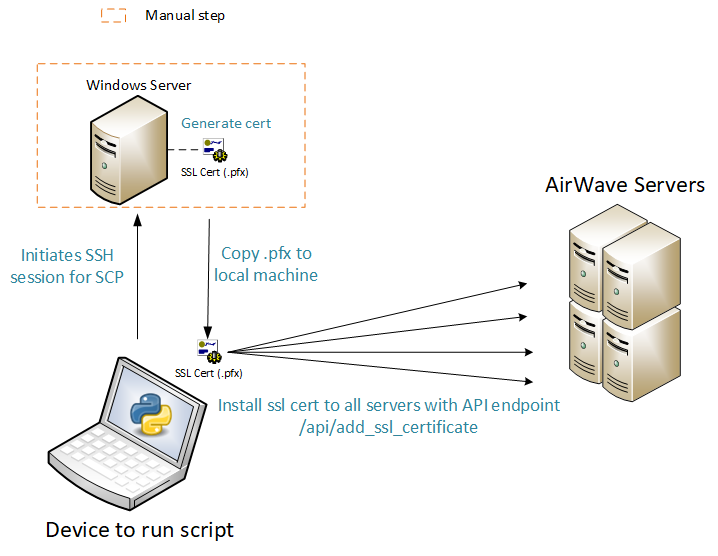
This visual is oversimplified and just for reference. I'll be getting into the specifics down in the How it works section below.
Why I made this
Since we only have to update the certificates once per year, there isn't significant time savings like with my other project, the ADGroupManager PowerShell module. So this one is more for the "because it's cool" factor, and at the same time, it didn't take a ton of effort to build it. Also, we have over a dozen AirWave servers in our fleet and I don't know, doing something a dozen times in a row gets boring. And hey, when it is that time of year again, it'll be super easy and only takes a few minutes.
How it works
The first step here is the only manual requirement, the rest of this section will go over how the Python script works with the SCP server and AirWave APIs. Refer to the picture above.
Obtaining the new certificate
As I mentioned in the Overview section, this solution is specific to the organization that I work at. Therefore, I had to request the new certificate through the MMC of a domain connected Windows Server that had rights to do so. This is the only required step that could not be automated here. Once the cert was generated or renewed, I save it to a local folder on the server that I will retrieve later on using SCP, noting the name of the certificate file.
Transferring file from Windows Server to local machine (or server)
This script could have been ran from my local laptop, but instead I'm using an Ubuntu Linux server that I have other scripts and automations set up on. So the laptop in the picture above actually represents my Linux server. To retrieve the newly generated SSL certificate from the Windows, I'm using SCP. The Windows Server has an SCP service running on it that I can use, and the SCP user's home directory is where I saved the cert as a .pfx file.
In terms of Python, I'm using the subprocess module which can basically run CLI commands. See my full function below and note the scp_command variable. Also, note that the variables in all caps like WIN_SERVER_IP were global variables in this instance.
def transfer_cert_from_windows(cert_file_name):
    local_cert_path = f"./{cert_file_name}"
    print(f"[INFO] Copying {cert_file_name} from Windows ({WIN_SERVER_IP}) to local directory...")

    scp_command = f"scp {WIN_USERNAME}@{WIN_SERVER_IP}:{WIN_FILEPATH}{cert_file_name} {local_cert_path}"

    try:
        subprocess.run(scp_command, shell=True, check=True)
        print("[SUCCESS] Certificate successfully copied to current directory!")
    except subprocess.CalledProcessError as e:
        print(f"[ERROR] SCP transfer failed: {e}")
        exit(1)

    return local_cert_path
Encoding the certificate
Once the certificate is copied over, it needs to be encoded in base64 format. The Aruba AirWave API documentation provides a shell command to do this, which is probably the easiest way to do this again using the subprocess module. I instead used the base64 Python module to accomplish this. The function I used is as follows.
def encode_cert(file_path):
    print(f"[INFO] Reading the certificate file: {file_path}")

    try:
        with open(file_path, "rb") as cert_file:
            encoded_cert = base64.b64encode(cert_file.read()).decode("utf-8")  # Convert bytes to string
        print("[SUCCESS] Certificate file successfully encoded to base64 format.")
        return encoded_cert
    except FileNotFoundError:
        print("[ERROR] Certificate file not found. Please check the file path.")
        exit(1)
    except Exception as e:
        print(f"[ERROR] An unexpected error occurred while encoding the certificate: {e}")
        exit(1)
Logging into AirWave via API
The API endpoint here is /LOGIN (idk why they have it in all caps also, I'm just going by what the documentation says) and uses username/password authentication. However, I have these servers configured with our RADIUS servers for backend authentication, and only admin users can authenticate through the API.
If successfully authenticated, the AirWave server will return a cookie and token called X-BISCOTTI. Any further API requests will use this cookie & token combo.
Here is the function I used that returns the X-BISCOTTI token & cookie.
def login_to_airwave(session, amp_ip):
    login_url = f'https://{amp_ip}/LOGIN'
    print(f"[INFO] Connecting to {amp_ip}...")

    response = session.post(
        login_url,
        headers={'Content-Type': 'application/x-www-form-urlencoded'},
        data={
            'destination': '/index.html',
            'credential_0': AW_USERNAME,
            'credential_1': AW_PASSWORD
        },
        verify=False
    )

    token = response.headers.get('x-biscotti')
    if token:
        print(f"[SUCCESS] Connected to {amp_ip}!")
        return token
    else:
        print(f"[ERROR] Failed to connect to {amp_ip}. No token received.")
Installing SSL Cert via API
The endpoint here is a POST request to /api/add_ssl_certificate, and requires the base64 encoded certificate as well as the password passed as parameters. In the headers of this request, I'll be adding the X-BISCOTTI token get got earlier.
Below is the function I use for this. Note that one of the arguments is session. This is a session set up from the requests Python module.
def install_ssl_cert(session, amp_ip, token, encoded_cert):
    print(f"[INFO] Installing SSL certificate on {amp_ip}...")

    # Create the JSON payload
    payload = {
        "cert_data": encoded_cert,
        "passphrase": CERT_PASSWORD
    }

    # API endpoint for installing SSL certificate
    api_url = f"https://{amp_ip}/api/add_ssl_certificate"

    # Headers with authentication token
    headers = {
        "Content-Type": "application/json",
        "x-biscotti": token  # AirWave authentication token
    }

    # Send the request to install SSL certificate
    response = session.post(api_url, headers=headers, json=payload, verify=False)
    print("[INFO] Waiting for API response...")

    if response.status_code == 200:
        print(f"[SUCCESS] SSL Certificate installed successfully on {amp_ip}!")
    else:
        print(f"[ERROR] Failed to install certificate on {amp_ip}: HTTP {response.status_code}")
        print(f"[ERROR] Response Message: {response.text}")
Looping through all the servers
Alright, so the function from the previous section takes care of one server, but what if I have over a dozen? For this we need a loop. Now I do not have asynchronous functions here (bite me), but this process doesn't need to be lightning fast so it's fine. First, I used a YAML file to store the information about my servers, mainly the IP addresses of them. Here's what some of that delicious YAML looks like (I changed the IPs for confidentiality reasons)
conductor:
  ip: 10.0.0.100
  url: https://airwave.wireless.mackin.it/
  name: conductor-console
airwave1:
  ip: 10.0.0.101
  url: https://ampprod01.wireless.mackin.it/
  name: north
airwave2:
  ip: 10.0.0.102
  url: https://ampprod02.wireless.mackin.it/
  name: wan
This next function will read the YAML file. In the for loop, you can see that the name and IP address of each server gets extracted from each item in the YAML file. Further in the loop, we log into each server and get the X-BISCOTTI token, then use the install_ssl_cert function I defined above on each server.
def process_servers(yaml_file, encoded_cert):
    print("[INFO] Loading AirWave servers from YAML file...")

    try:
        with open(yaml_file, "r") as file:
            servers = yaml.safe_load(file)
    except FileNotFoundError:
        print("[ERROR] YAML file not found. Please check the path.")
        exit(1)
    except Exception as e:
        print(f"[ERROR] An error occurred while loading YAML file: {e}")
        exit(1)

    session = requests.Session()

    for server_name, server_info in servers.items():
        amp_ip = server_info["ip"]
        print(f"\n[INFO] Processing server: {server_name} ({amp_ip})")

        # Log in and retrieve token
        token = login_to_airwave(session, amp_ip)
        if token:
            install_ssl_cert(session, amp_ip, token, encoded_cert)

    print("\n[INFO] SSL certificate installation process completed for all servers.")